> ## Documentation Index
> Fetch the complete documentation index at: https://info.expresskeys.store/llms.txt
> Use this file to discover all available pages before exploring further.
# Seliware
## Quick Links
Website: [https://seliware.com/](https://seliware.com/) | Discord: [https://discord.gg/nzEggEE9vx](https://discord.gg/nzEggEE9vx)
***
## Install Guide
A 64-bit system running windows 10 or 11 is required.
#### Required Dependancies
Download - [https://aka.ms/vs/17/release/vc\_redist.x64.exe](https://aka.ms/vs/17/release/vc_redist.x64.exe)
Download - [https://go.microsoft.com/fwlink/p/?LinkId=2124703](https://go.microsoft.com/fwlink/p/?LinkId=2124703)
#### Downloading the installer
Windows Defender & Chrome Safe Browsing may need to be disabled beforehand.
1. Open [https://seliware.com](https://seliware.com) in your browser.
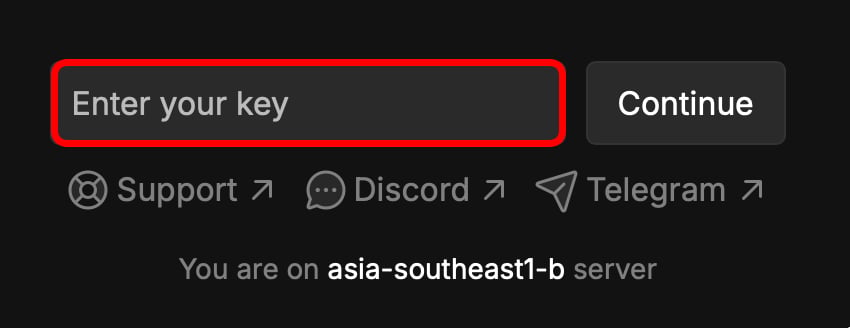
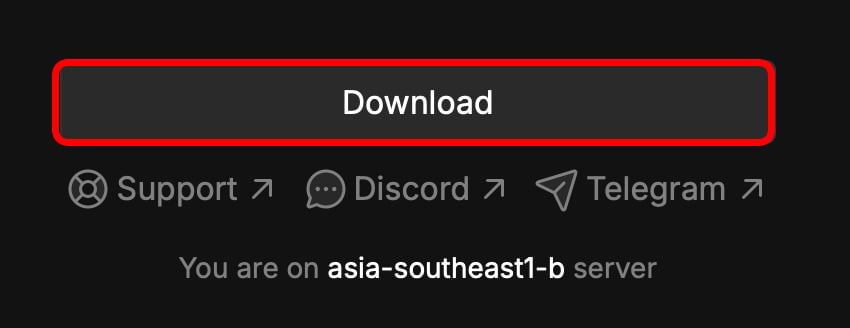
2. Input your key into the website, and click download.
|  |
|  |
| --------------------------------------------------------------------------------------------------------------------------------------------------------------------------------------------------------------------------------------------------------------------------------------------------------------------------------------------------------------------------------------------------------------------------------------------------------------------------------------------------------------------------------------------------------------------------------------------------------------------------------------------------------------------------------------------------------------------------------------------------------------------------------------------------------------------------------------------------------------------------------------------------------------------------------------------------------------------------------------------------------------------------------------------------------------------------------------------------------------------------------------------------------------------------------------------------------------------------------------------------------------------------------------------------------------------- | ----------------------------------------------------------------------------------------------------------------------------------------------------------------------------------------------------------------------------------------------------------------------------------------------------------------------------------------------------------------------------------------------------------------------------------------------------------------------------------------------------------------------------------------------------------------------------------------------------------------------------------------------------------------------------------------------------------------------------------------------------------------------------------------------------------------------------------------------------------------------------------------------------------------------------------------------------------------------------------------------------------------------------------------------------------------------------------------------------------------------------------------------------------------------------------------------------------------------------------------------------------------------------------------------------------------------------------------- |
#### Installing the software
1. Open the downloaded installer.
2. This section is still being written..
#### Frequently asked Questions
**Q:** Where is autoexecution?\
**A:** In `%localappdata%\seliware\autoexec`.
**Q:** Where is workspace?\
**A:** In `%localappdata%\seliware\workspace`.
**Q:** How do I inject?\
**A:** Seliware will auto inject once it detects a game client.
***
## Quick Fixes
#### **Please synchronize your time**
**Zapret** causes this error. If you have **Zapret** enabled, you must disable it to fix the issue.
1. Press the Windows key and type `CMD`, then right click "Terminal" and select `Run as Administrator`.
2. Paste the command below and press enter.\\
```text theme={null}
sc config w32time start= auto & net start w32time & w32tm /config /manualpeerlist:time.google.com /syncfromflags:manual /update & w32tm /resync /rediscover
```
#### **Incompatible Roblox Version**
1. Install Fishstrap ([https://fishstrap.app](https://www.fishstrap.app)).
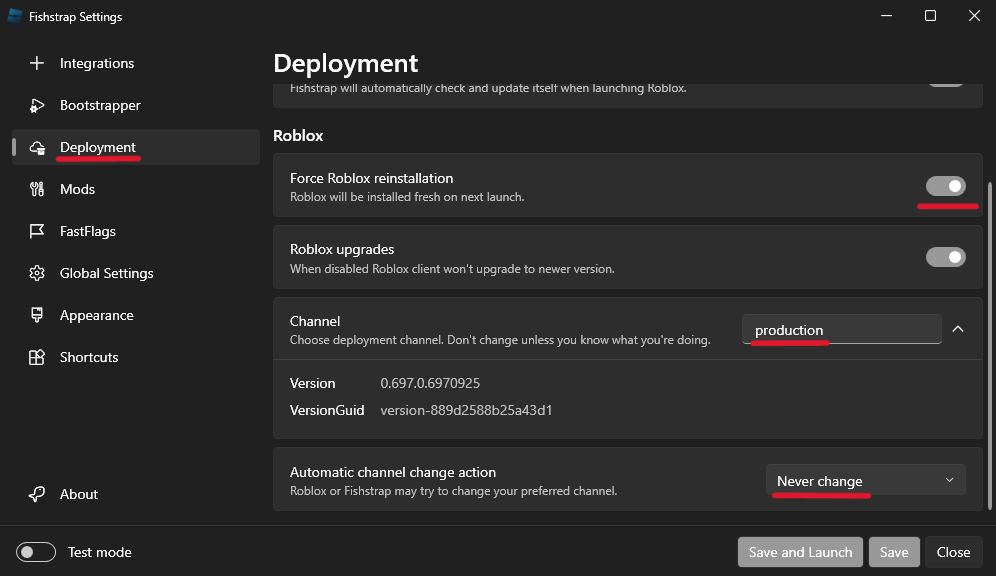
2. Use the following settings on the `Deployment` Tab.
|
| --------------------------------------------------------------------------------------------------------------------------------------------------------------------------------------------------------------------------------------------------------------------------------------------------------------------------------------------------------------------------------------------------------------------------------------------------------------------------------------------------------------------------------------------------------------------------------------------------------------------------------------------------------------------------------------------------------------------------------------------------------------------------------------------------------------------------------------------------------------------------------------------------------------------------------------------------------------------------------------------------------------------------------------------------------------------------------------------------------------------------------------------------------------------------------------------------------------------------------------------------------------------------------------------------------------------- | ----------------------------------------------------------------------------------------------------------------------------------------------------------------------------------------------------------------------------------------------------------------------------------------------------------------------------------------------------------------------------------------------------------------------------------------------------------------------------------------------------------------------------------------------------------------------------------------------------------------------------------------------------------------------------------------------------------------------------------------------------------------------------------------------------------------------------------------------------------------------------------------------------------------------------------------------------------------------------------------------------------------------------------------------------------------------------------------------------------------------------------------------------------------------------------------------------------------------------------------------------------------------------------------------------------------------------------------- |
#### Installing the software
1. Open the downloaded installer.
2. This section is still being written..
#### Frequently asked Questions
**Q:** Where is autoexecution?\
**A:** In `%localappdata%\seliware\autoexec`.
**Q:** Where is workspace?\
**A:** In `%localappdata%\seliware\workspace`.
**Q:** How do I inject?\
**A:** Seliware will auto inject once it detects a game client.
***
## Quick Fixes
#### **Please synchronize your time**
**Zapret** causes this error. If you have **Zapret** enabled, you must disable it to fix the issue.
1. Press the Windows key and type `CMD`, then right click "Terminal" and select `Run as Administrator`.
2. Paste the command below and press enter.\\
```text theme={null}
sc config w32time start= auto & net start w32time & w32tm /config /manualpeerlist:time.google.com /syncfromflags:manual /update & w32tm /resync /rediscover
```
#### **Incompatible Roblox Version**
1. Install Fishstrap ([https://fishstrap.app](https://www.fishstrap.app)).
2. Use the following settings on the `Deployment` Tab.
 ### 0 Active Instances, but Roblox is open
1. Open Windows Defender.
2. Open `Virus & Threat Protection` and disable `Real Time Protection`.
3. Open `App & Browser Control` and disable `Smart App Control`.
4. Restart Seliware, then launch Roblox.
#### Missing core file
1. Open Windows Defender.
2. Open `Virus & Threat Protection` and disable `Real Time Protection`.
3. Reinstall Seliware.
### 0 Active Instances, but Roblox is open
1. Open Windows Defender.
2. Open `Virus & Threat Protection` and disable `Real Time Protection`.
3. Open `App & Browser Control` and disable `Smart App Control`.
4. Restart Seliware, then launch Roblox.
#### Missing core file
1. Open Windows Defender.
2. Open `Virus & Threat Protection` and disable `Real Time Protection`.
3. Reinstall Seliware.